What is this symbol versioning?
Symbol versioning allows adding version information to symbols. This allows
you to define multiple versions of the same function in your library,
for example, readFoo@V1 and readFoo@V2, and your library users can decide
which variant they want to use.
Why is it helpful?
It is helpful because it helps to update libraries while still keeping them backward compatible. A program does not need to be modified / rebuilt when using newer versions of a library that use symbol versioning for backward-compatibility.
This sounds cool! How exactly does symbol versioning help with backward compatibility?
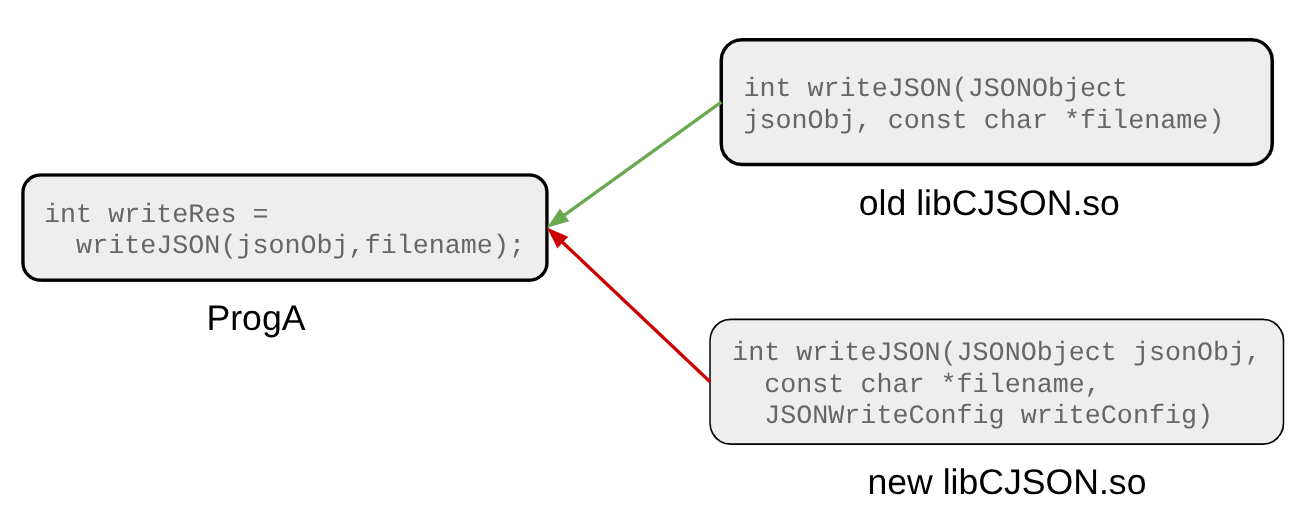
Let’s say we have a JSON library CJSON that allows to read and write JSON files, and it
exposes a function writeJSON(JSONObject json, const char *filename). This function
writes a JSON object to a file. Now let’s say that we want to add a new parameter
JSONWriteConfig writeConfig to this function. This parameter stores configuration such
as the formatting to use when printing the JSON object to the file.
Here’s the key issue: If we add this new parameter to writeJSON API and ships
the updated library, then all programs that are using CJSON shared library will stop working.
They all expect writeJSON(JSONObject json, const char *filename) function but the library
does not expose this function anymore. Remember that this all may happen without
the knowledge or any sort of permission from the program that is now suddenly not
working. A program, let’s say ProgA, is using libCJSON.so from the system. The system
updates and now we have the updated libCJSON.so that has the updated writeJSON interface.
The program ProgA automatically starts using the updated libCJSON.so as the newer libCJSON.so
has replaced the older libCJSON.so in the system.
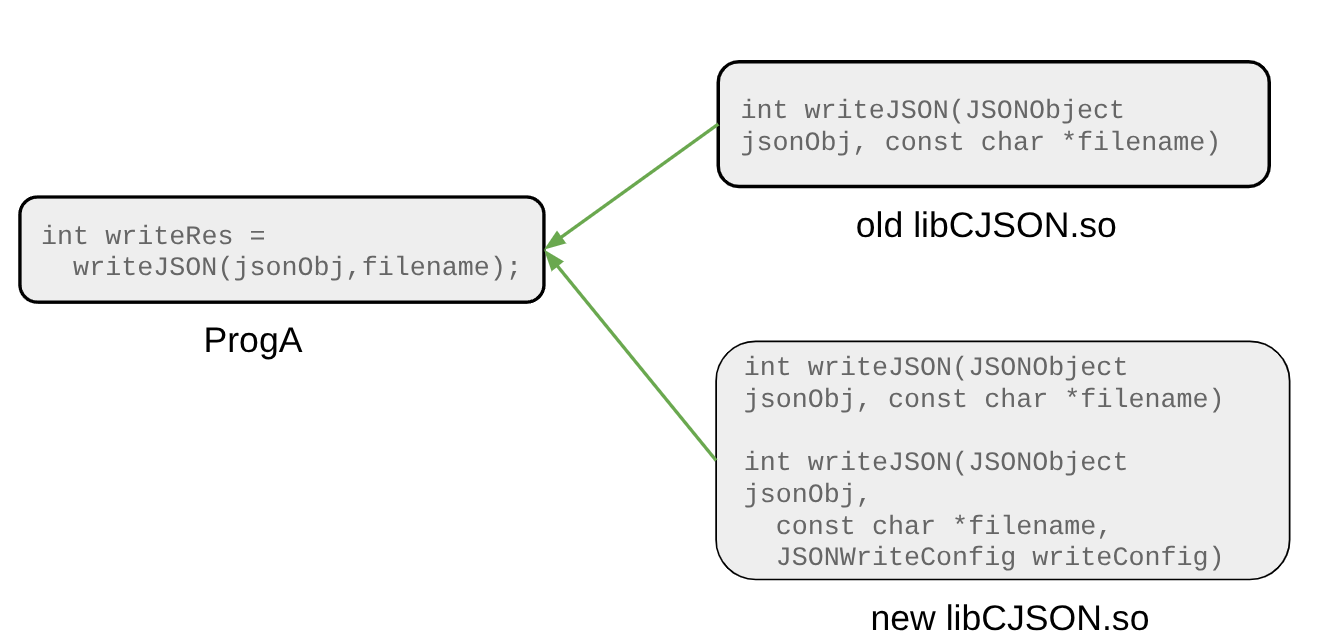
With symbol versioning, the updated libCJSON.so can somehow contains both the variants:
writeJSON(JSONObject json, const char *filename) and
writeJSON(JSONObject json, const char *filename, JSONWriteConfig writeConfig) and the old programs
magically use the right variant. Note that libCJSON.so, as the name suggests, is a C library and
thus there is no inherent concept of function overloading.
I see. This got me a little curious. How was backward compatibility handled before?
soname property is typically used to associate versions with a shared library so that
programs do not accidentally use incompatible shared library versions. Note that it is not exactly
handling backward compatibility, it is a mechansim to quickly identify
incompatible shared libraries and report an error.
For the nerds: Shared library’s soname is stored in the DT_SONAME field of the .dynamic section.
I am sold. How do I use this new feature called symbol versioning?
How can I specify version requirements for my symbols?
We can specify version requirements by using a pinch of assembly.
// 1.o

__asm__(".symver writeJSON, writeJSON@V1");

int foo() {
  // ...
  writeJSON(...); // refers to writeJSON@V1
  // ...
}
Voila! writeJSON call now refers to writeJSON@V1.
How do I define multiple versions of a symbol in my shared library?
Version scripts in conjunction with the pinch of assembly that we saw before allows us to define multiple versions of a symbol.
// CJSON.c

#include "CJSON.h"

__asm__(".symver writeJSON1, writeJSON@V1");
int writeJSON1(struct JSONObject json, const char *filename) {
  // ...
}

__asm__(".symver writeJSON2, writeJSON@@V2");
int writeJSON2(struct JSONObject json, const char *filename,
               struct JSONWriteConfig writeConfig) {
  // ...
}
# vs.t
V1 {
  global:
    writeJSON;
};

V2 {
  global:
    writeJSON;
};
clang -o CJSON.o -c -fPIC
ld.eld -o libCJSON.so CJSON.o -shared --version-script vs.t
Each version must be specified in the version script.
Do the users have to specify the version for all of my library versioned symbols?
God, no. That would be awful. A library can, and pretty much always does, provide default versioned symbols. The default versioned symbol is used when a user has not explicitly specified which version to use.
Oh, thank God. How do I specify default versioned symbols?
It’s simple. Just use @@ instead of @ in the versioned name.
// Defines non-default versioned symbol.
__asm__(".symver writeJSON1, writeJSON@V1");
int writeJSON1(struct JSONObject json, const char *filename) {
  // ...
}

// Defines a default versioned symbol.
__asm__(".symver writeJSON2, writeJSON@@V2");
int writeJSON2(struct JSONObject json, const char *filename,
               struct JSONWriteConfig writeConfig) {
  // ...
}
I think I am getting a hang of it now. But I have a concerning doubt now.
What happens if I update my shared library and a user program binary was not using explicit versions for my library symbols?
When the linker resolves a user program undefined unversioned symbol reference foo to a
library’s versioned defined foo@@V2, then it binds the version of foo to V2. At runtime,
the loader resolves this undefined foo@V2 reference with the library’s defined foo@V2.
If the library is updated and now it has symbols: foo@V1, foo@V2 and foo@@V3, and the
user program binary is as it was before, then it still works correctly because the loader
still sees foo@V2 undefined symbol in the dynamic symbol table, and the foo call was already
morphed to foo@V2 call by the linker.
What happens if there are multiple shared libraries that define versions for the same symbol?
For the most part, it is not all too different from how symbol resolution works for non-versioned symbols. However, it does have some gotchas as we will soon see.
Symbol resolution basic rules for versioned symbols are the same as for non-versioned symbols.
The runtime loader will select the first symbol in the symbol lookup that satisfies
an undefined reference. In brief, the symbol lookup order is the symbols in-order from
a sequence of modules. For example, if the sequence of modules is A, B and C, then the symbol
lookup order will be: symbols of module A, followed by symbols of module B, followed by symbols
of module C. This sequence of modules, in the usual case, is:
the main executable, followed by the breadth first search over the shared libraries dependency graph.
Let’s understand this with a help of an example:
#!/usr/bin/env bash

cat >lib1.c <<'EOF'
int foo1(void) {
  return 11;
}

int foo2(void) {
  return 12;
}

__asm__(".symver foo1, foo@V1");
__asm__(".symver foo2, foo@@V2");
EOF

cat >lib2.c <<'EOF'
int foo1(void) {
  return 21;
}

int foo2(void) {
  return 22;
}

__asm__(".symver foo1, foo@V1");
__asm__(".symver foo2, foo@@V2");
EOF

cat >lib3.c <<'EOF'
int foo1(void) {
  return 31;
}

int foo2(void) {
  return 32;
}

__asm__(".symver foo1, foo@V1");
__asm__(".symver foo2, foo@@V2");
EOF

cat >vs.t <<'EOF'
V1 {
  foo;
};

V2 {
  foo;
} V1;
EOF

cat >main.c <<'EOF'
#include <stdio.h>
int foo();


int main(void) {
  printf("foo: %d\n", foo());
  return 0;
}
EOF

clang -c -fPIC lib1.c -o lib1.o
ld.lld -shared -o lib1.so lib1.o --version-script vs.t

clang -c -fPIC lib2.c -o lib2.o
ld.lld -shared -o lib2.so lib2.o --version-script vs.t

clang -c -fPIC lib3.c -o lib3.o
ld.lld -shared -o lib3.so lib3.o --version-script vs.t

clang -c main.c -o main.o
clang -o main.out main.o -L. -l1 -l2 -l3 -Wl,-rpath,'$ORIGIN'
./main.out
Here the output is: foo: 12 and the symbol lookup order here is:
[symbols(main.o), symbols(lib1.so), symbols(lib2.so), symbols(lib3.so)].
foo is resolved to foo@@V2 of lib1.so. foo@@V2 is able to resolve foo
because foo@@V2 is a default versioned symbol, that is, it can resolve both
foo and foo@V2.
Now, let’s see an another example.
#!/usr/bin/env bash

cat >lib1.c <<'EOF'
int foo1(void) {
  return 11;
}

int foo2(void) {
  return 12;
}

__asm__(".symver foo1, foo@V1");
__asm__(".symver foo2, foo@V2");
EOF

cat >lib2.c <<'EOF'
int foo1(void) {
  return 21;
}

int foo2(void) {
  return 22;
}

__asm__(".symver foo1, foo@V1");
__asm__(".symver foo2, foo@@V2");
EOF

cat >lib3.c <<'EOF'
int foo1(void) {
  return 31;
}

int foo2(void) {
  return 32;
}

__asm__(".symver foo1, foo@V1");
__asm__(".symver foo2, foo@V2");
EOF

cat >vs.t <<'EOF'
V1 {
  foo;
};

V2 {
  foo;
} V1;
EOF

cat >main.c <<'EOF'
#include <stdio.h>
int foo();


int main(void) {
  printf("foo: %d\n", foo());
  return 0;
}
EOF

clang -c -fPIC lib1.c -o lib1.o
ld.lld -shared -o lib1.so lib1.o --version-script vs.t

clang -c -fPIC lib2.c -o lib2.o
ld.lld -shared -o lib2.so lib2.o --version-script vs.t

clang -c -fPIC lib3.c -o lib3.o
ld.lld -shared -o lib3.so lib3.o --version-script vs.t

clang -c main.c -o main.o
clang -o main.out main.o -L. -l1 -l2 -l3 -Wl,-rpath,'$ORIGIN'
./main.out
Here the symbol lookup order is the same as before.
Do you want to guess the output?
foo: 12
The foo() output is 12!?!? It should be 22. This makes no sense!
It does makes some sense. The linker sees that foo() call in main.o is resolved
to lib2.so[foo@@V2]. Hence, it notes the version V2 for main.o[foo]. We can see
this by running llvm-readelf --dyn-syms --version-info main.out. Now, at runtime,
the loader searches for foo@V2 instead of foo, and thus, lib1.so[foo@V2] satisfies the
undefined symbol. Here we learn an important lesson:
The link time symbol resolution can be at constrast from the runtime symbol resolution.
Now, let’s see another example:
#!/usr/bin/env bash

cat >lib1.c <<'EOF'
__asm__(".symver foo, foo@V1");
int foo();

int foo1(void) {
  return 11;
}

int foo2(void) {
  return 12;
}

int bar1(void) {
  return 111;
}

int bar2(void) {
  return foo();
}

__asm__(".symver foo1, foo@V1");
__asm__(".symver foo2, foo@@V2");
__asm__(".symver bar1, bar@V1");
__asm__(".symver bar2, bar@@V2");
EOF

cat >lib2.c <<'EOF'
int foo1(void) {
  return 21;
}

int foo2(void) {
  return 22;
}

int bar1(void) {
  return 211;
}

int bar2(void) {
  return 212;
}

__asm__(".symver foo1, foo@V1");
__asm__(".symver foo2, foo@@V2");
__asm__(".symver bar1, bar@V1");
__asm__(".symver bar2, bar@@V2");
EOF

cat >lib3.c <<'EOF'
int foo1(void) {
  return 31;
}

int foo2(void) {
  return 32;
}

int bar1(void) {
  return 311;
}

int bar2(void) {
  return 312;
}

__asm__(".symver foo1, foo@V1");
__asm__(".symver foo2, foo@@V2");
__asm__(".symver bar1, bar@V1");
__asm__(".symver bar2, bar@@V2");
EOF

cat >vs.t <<'EOF'
V1 {
  foo;
  bar;
};

V2 {
  foo;
  bar;
} V1;
EOF

cat >main.c <<'EOF'
#include <stdio.h>
int bar();
int foo() {
  return 77;
}

int main(void) {
  printf("bar: %d\n", bar());
  return 0;
}
EOF

clang -c -fPIC lib1.c -o lib1.o
ld.lld -shared -o lib1.so lib1.o --version-script vs.t

clang -c -fPIC lib2.c -o lib2.o
ld.lld -shared -o lib2.so lib2.o --version-script vs.t

clang -c -fPIC lib3.c -o lib3.o
ld.lld -shared -o lib3.so lib3.o --version-script vs.t

clang -c main.c -o main.o
clang -o main.out main.o -L. -l1 -l2 -l3 -Wl,-rpath,'$ORIGIN'
LD_LIBRARY_PATH="$(pwd):${LD_LIBRARY_PATH}" ./main.out
Here we again have same symbol lookup order.
Do you want to guess the output?
foo: 77
The answer should have been 11. 77 makes no sense. What is happening?
Indeed weird things are happening. Or perhaps, rules are just weird. Let’s understand this in detail.
main.o calls bar. This bar is resolved to lib1.so[bar@@V2] by both the linker
and the runtime loader. lib1.so[bar@@V2] calls foo@V1. foo@V1 is resolved to
main.o[foo]. Yes, you read that right. foo@V1 is resolved to main.o[foo].
This brings us to another rule:
Unversioned symbol definitions can satisfy undefined versioned symbols
Let’s see an another example:
#!/usr/bin/env bash

cat >lib1.c <<'EOF'
int foo() {
  return 77;
}
EOF

cat >lib2.c <<'EOF'
int foo1(void) {
  return 31;
}

int foo2(void) {
  return 32;
}

__asm__(".symver foo1, foo@V1");
__asm__(".symver foo2, foo@@V2");
EOF

cat >vs.t <<'EOF'
V1 {
  foo;
};

V2 {
  foo;
} V1;
EOF

cat >main.c <<'EOF'
#include <stdio.h>
__asm__(".symver foo, foo@V1");
int foo();

int bar() {
  return foo();
}

int main(void) {
  printf("bar: %d\n", bar());
  return 0;
}
EOF

clang -c -fPIC lib1.c -o lib1.o
ld.bfd -shared -o lib1.so lib1.o

clang -c -fPIC lib2.c -o lib2.o
ld.lld -shared -o lib2.so lib2.o --version-script vs.t

clang -c main.c -o main.o
clang -o main.out main.o -L. -l1 -l2 -l3 -Wl,-rpath,'$ORIGIN'
./main.out
Do you want to guess the output?
foo: 77
Ah, I see. foo will be resolved to lib2.so[foo@V1] at link time, but at runtime the loader
will resolve the undefined foo@V1 reference to lib1.so[foo]. I understand it now, but I still
do not like this behavior.
Congratulations! You pass the symbol versioning symbol resolution test.
How is symbol versioning implemented?
Enabling symbol versioning requires support from the compiler, linker and the loader. We are majorly focussed on the linker picture in this article, though we will briefly discuss the compiler and the runtime role as well.
Compiler side of the picture
The compile role here is relatively straightforward. Whenever the compiler
sees __asm__(".symver foo, foo@V1") directive, then it changes all the
reference / definition of foo to foo@V1. If foo was a definition, then
foo@V1 is an alias to foo and the symbol table contains both the foo and
foo@V1. And if foo was not a definition, then foo@V1 effectively replaces
foo and thus the symbol table just contains foo@V1.
Loader side of the picture
We will see loader side of the picture first because it will make it easier to understand why linker do what it does.
We will not go in too much depth for loader here, just the information necessary to understand symbol versioning at some level.
Loader goes over each module’s dynamic symbol table and symbol versioning sections. Symbol versioning sections are as follows:
-
.gnu.version (SHT_GNU_versym)It is an array of
-
.gnu.version_d (SHT_GNU_verdef) -
.gnu.version_r (SHT_GNU_verneed)
Linker side of the picture
The linker role in enabling symbol versioning is much more involved.
We will understand the linker role in two key parts: Creating a shared library with symbol versioning, and Creating an executable that uses shared libraries with symbol versioning.